
Member access · 2026 season
Show up.
Sound together.
See your official event and rehearsal availability directly from the live NGWS attendance sheet.
Band noticeboard
Read this first.
Good evening
Make your call.
!
Tight turnaround PAF and Island Symphony repertoire will run concurrently. Please keep every response current.
Connecting to the official attendance sheet…
Update in live attendance sheetAug & Sep 2026
Rehearsal availability
30-second check-out
Was rehearsal fruitful?
Live uniform register
New Band T-shirt sizes.
Ready to load the live registerOnly records allowed by your active role will be returned.
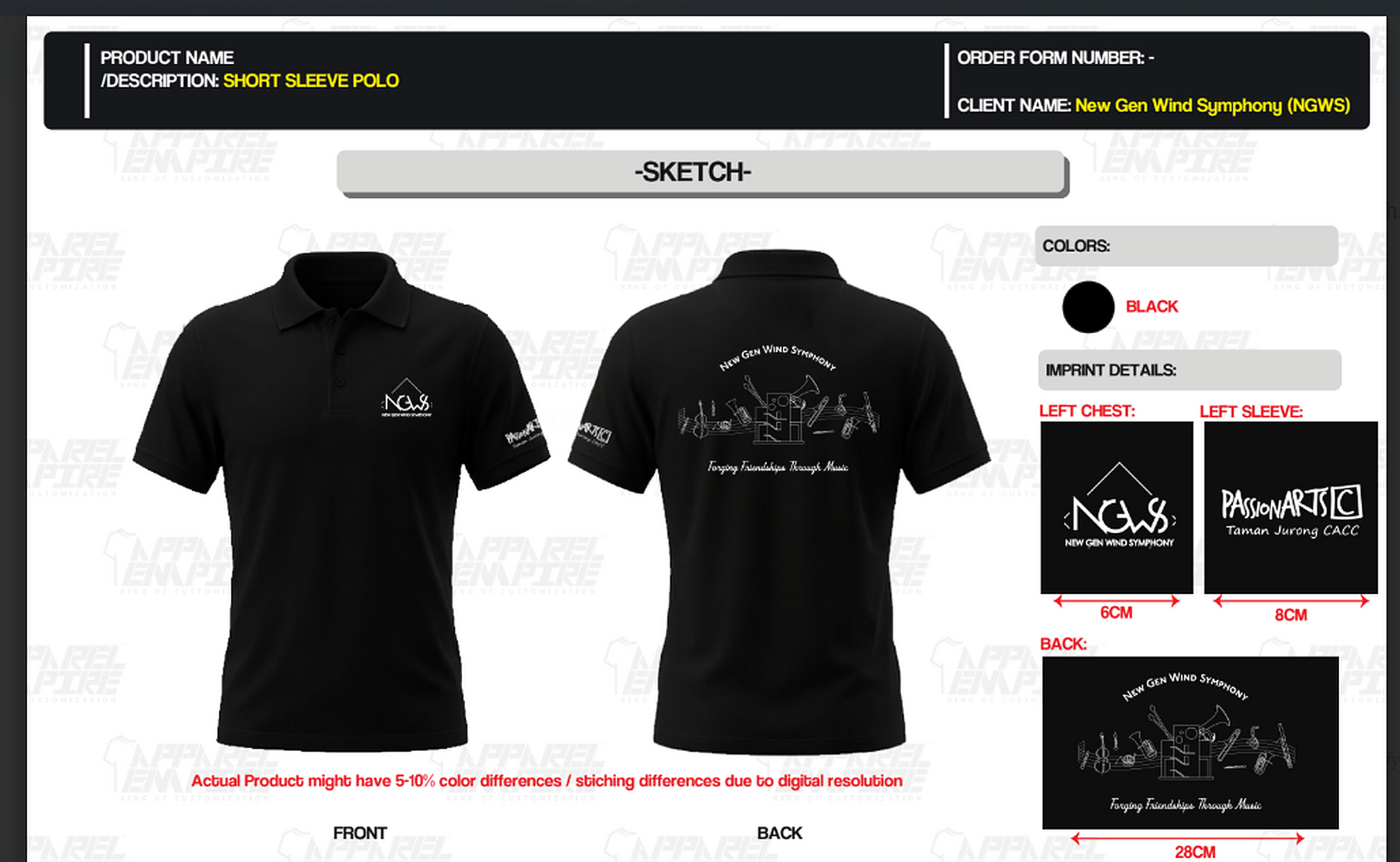
Approved polo designFront, sleeve and back artwork
View full resolution ↗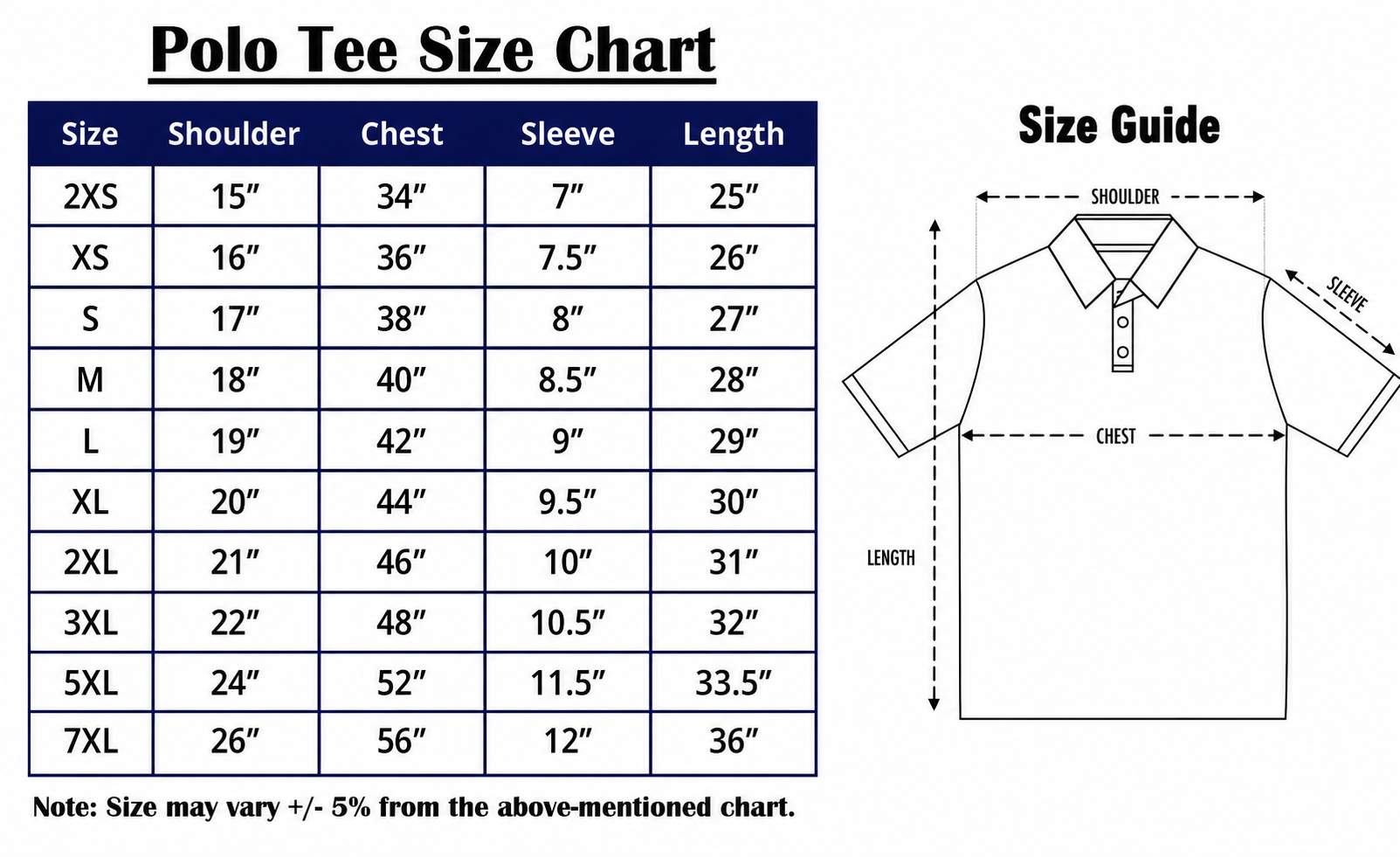
Polo size guideMeasurements in inches · allow plus or minus 5%
View full resolution ↗♕
Loading your protected T-shirt record…
The portal is checking the live NGWS register.
Central IT ticketing
Report an issue or idea.
Personal support history
My IT tickets.
New→In progress→Resolved→Your review→Closed & archived
When Alvin marks a fix resolved, it appears here for your review. Confirm that it works to close and archive the ticket, or explain what still needs attention to return it to IT. Archived records remain visible as your past support history.
⌛
Loading your tickets…
Named access and MFA
People, roles & concert parts.
Account directory
Access and MFA status
Authorised MFA identitiesAccount Table ID is the permanent portal identity key. A person appears below only after their account is active and MFA setup is complete.
Committee & Band Director
2026 readiness room.
Rehearsal runway
Attendance & section strength
Actual vs planned
All visible players
Actual Planned yes Pending No
Member feedback
Rehearsal pulse responses
No shared pulse responses yet.
Upcoming two events
Instrumentation coverage
Locked actual attendance
Section reliability
Performance review
Members needing attention
Attendance is one consideration only. The Music Director should also consider approved leave, musical readiness, part criticality and section coverage before changing a concert roster.
Choose a flexible pops wind set—not a conventional stage band yet.
PAF has strong trumpet and trombone depth, but the current list does not confirm the five-part sax/reed line and rhythm section a standard big band expects. Island Symphony is even leaner through saxes and low voices.
Recommendation confidence
86%
Brass-led festival pops
- Use flexible wind-band arrangements with optional parts
- Feature brass and percussion energy
- Add sax/brass chamber spotlights between full-band works
- Recruit or reinforce bass before Island Symphony
Three readiness gates
- Low-end: confirm tuba, double bass or keyboard bass
- Reeds: reach 4–5 saxes for a true stage-band book
- Runway: keep final two rehearsals above 75% of event roster
Planning basis
The recommendation combines the workbook signup with established big-band personnel patterns and rehearsal-planning guidance. It is decision support, not an artistic verdict.
Jazz at Lincoln Center lineup ↗Yamaha ensemble planning ↗Yamaha rehearsal planning ↗Committee final record
Attendance register.
Official record
This view mirrors the NGWS attendance spreadsheet. Make corrections in the live sheet so the Bandsmen’s Board, member portal and committee figures remain consistent.
Open live sheet ↗Committee publishing
One message. Everywhere.
Direct-send option
WhatsApp Business connection
Direct API broadcasts require a WhatsApp Business Account, member opt-in, approved templates, a secure server, and either eligibility for Meta’s restricted Groups API or individual delivery. Tokens must never live in this webpage.
Portal publishing Ready
Group handoff Ready
Direct API send Setup needed
Committee operating manual
Understand and run the NGWS platform.
New Gen Wind Symphony · 2026
Committee platform guide
A plain-language operating manual for the President, committee, Music Director, Band Director and appointed platform custodians. Technical terms are numbered and explained in the glossary.
01
Purpose and boundaries
What this platform is—and is not
The NGWS platform gives the band one maintained digital home for public information, member readiness, attendance, scores, rehearsal feedback, membership interest and accountable technical support. It supports committee decisions; it does not replace artistic judgement, official committee minutes, financial approval or the official attendance spreadsheet.
Committee principle
The website may present information and collect responses, but the named band officer remains accountable for the underlying decision and record.
Band identity, approved leadership information, events, media and recruitment.
Announcements, attendance, scores, rehearsal feedback and issue reporting after profile sign-in.
Readiness analysis, identified feedback, attendance review, broadcasting, tickets, security and governance guidance.
02
People and permissions
Named accounts, MFA and four access groups
| Group | Roles | Can view | Can change |
|---|---|---|---|
| Public | No login | Approved public website only | May submit a membership application or public form |
| Group 1 | Music Director, Committee, Board, IT Administrator | All scores, overall attendance, all T-shirt sizes and the full ticket queue | Onboards users, changes appointments and membership states; IT Administrator alone unlocks accounts and signs off technical work |
| Group 2 | Appointed Main and Assistant Section Leaders | Section scores, section attendance, section T-shirt sizes and tickets from players in their led sections | Assigns one or more section parts to players for each concert project |
| Group 3 | Regular Bandsmen | Personal attendance, own T-shirt size, assigned instrument-part scores and own tickets | Changes own password, submits feedback and reports issues |
| Group 4 | Guest Players | Personal attendance, own T-shirt size, own tickets and assigned parts for one approved project | Uses the portal only until the SGT expiry set by Group 1 |
One person may hold several roles
Every user signs in with an individual password and authenticator code, then chooses an assigned active role. Alvin may switch between IT Administrator and Bandsman without sharing credentials.
03
Public website
What visitors can use
Band identity
Our story, executive board, committee, photographs, events and approved external channels.
Join the band
A prospective player provides name, age, experience, profession, instrument and current commitments. The submission becomes a membership ticket for review.
Private operations stay private
Central IT and the Score Library appear only after Musician Portal authentication and the required role check.
Responsive access
Typography and navigation are designed for phone, tablet, desktop and short landscape screens, with keyboard and reduced-motion support.
Content-change procedure
- Officer confirms accuracy.Identify the accountable content owner and exact wording or approved asset.
- Alvin implements and tests.Check phone, tablet, desktop, links and accessibility.
- Publish through source control.Record the change in GitHub2 and verify the live Cloudflare production route.
04
Musician Portal
The member’s normal journey
- Activate the private invitation.Choose a personal password, scan the locally generated NGWS QR code, confirm the six-digit code and save the one-use recovery codes.
- Sign in and choose a role.Multi-role people choose the access needed for this session; the Worker enforces that scope.
- Review attendance and participation.Group 1 sees the band, Group 2 its sections, and Groups 3–4 only the signed-in player.
- Check the live T-shirt register.Group 1 sees all sizes, appointed SLs see only their led sections, and Groups 3–4 receive only the size matched to their own account. Shared views are grouped by section and flag missing sizes for follow-up.
- Open assigned scores.The filtered Score Library returns only all-band, section or personal concert-part access allowed by the active role. Group 4 is restricted to its approved project.
- Submit and review a ticket.The authenticated account supplies the member identity. A resolved fix appears under My IT tickets; confirm it to close and archive the record, or return it to IT with a follow-up note.
- Change the personal password.The current password and authenticator code are required; other sessions are signed out.
Source of truth3
The official Google spreadsheet remains authoritative for attendance and T-shirt sizes, while D1 is authoritative for named accounts, roles, guest expiry and concert-part assignments.
Departed is not deleted
Group 1 may remove individual part assignments or mark a person departed. Departed status blocks sign-in and ends sessions but retains the member record and audit history for deliberate reactivation.
05
Committee and director tools
How to use each committee area
Director dashboard
Reviews signup coverage, attendance trends, section reliability, members needing attention and identified rehearsal feedback. Treat recommendations as decision support, not automatic artistic decisions.
Attendance register
Mirrors the official sheet for a selected rehearsal. Correct the live sheet rather than maintaining a conflicting copy in the browser.
Broadcast centre
Builds a consistent portal announcement and WhatsApp-ready message. The operator still selects the official group and confirms sending.
Membership requests
Reviews applicants before adding anyone to band strength. Seek President Yvonne or the nominated approving authority where required.
Central IT tickets
Committee can read reported bugs, suggestions, requested features and resolution notes. Alvin resolves and notifies; the requester confirms the fix, which closes and moves the complete record to Archived.
Platform manual
This page is the maintained committee explanation. Download the HTML copy before meetings or governance reviews.
Do not treat dashboard colour as a verdict
Attendance is only one consideration. Approved leave, musical readiness, part criticality, section coverage and the Music Director’s judgement still apply.
06
Data, files and records
Where information is held
| Information | System holding it | Who uses it | Committee decision needed |
|---|---|---|---|
| Roster, attendance and T-shirt sizes | Official Google spreadsheet | Portal users within their server-enforced role scope | Named sheet custodian, correction process and restricted source-sheet sharing |
| Applications, rehearsal pulses, tickets and audit events | Cloudflare D14 | Relevant member, committee or IT views | Retention period and deletion authority |
| Bug screenshots | Private Cloudflare R25 | Committee read-only; Alvin resolves | Evidence retention and privacy rules |
| Score files | Protected Worker static assets | Signed-in bandsmen | Copyright, distribution and removal authority |
| Website source and change history | Private GitHub repository | Alvin and approved continuity owner | Backup administrator and handover plan |
| Browser-local notes | Member’s own device storage | That browser/device only | Explain that clearing browser data removes them |
Do not place passwords, API tokens6, private member data or payment details in public web pages, GitHub files or downloadable reports.
07
Security and privacy
Controls the committee should understand
Personal passwords
Passwords are salted and strengthened with PBKDF2 before D1 storage. Raw passwords never enter source code or audit logs.
Authenticator MFA
A six-digit TOTP code is required after the password. The seed is encrypted using a separate Cloudflare Worker secret.
Combined five-attempt lockout
Wrong passwords, MFA codes and recovery codes share one limit for every account. The fifth failure locks it and reports an incident.
Role and data checks
The Worker applies the active role to attendance rows, score indexes, score files, ticket lists and administrative actions.
Private evidence
R2 is not a public bucket. Screenshots are streamed only after personal, section or full-band authorization.
Recovery and unlocking
Recovery codes are one-use hashes. Only Alvin in the active IT Administrator role can unlock an account after investigation.
Suspected incident procedure
- Do not delete evidence.Record time, affected device and what the person observed.
- Notify Alvin and an officer.Use a trusted channel; never forward exposed secrets in plain text.
- Contain access.Keep the account locked and revoke affected roles where approved.
- Investigate and document.Create or update an IT ticket and record the final resolution.
- Unlock deliberately.Alvin activates the IT Administrator role, resolves the incident and restores the account.
08
Hosting and delivery
How the website stays online
Cloudflare Workers8 serves the public pages, protected portal and centralized secure APIs. GitHub retains versioned source so a known earlier version can be identified and redeployed.
Custom domain and DNS
A domain name is a band-owned address. DNS9 points that address to production; it is not another server. The band or Treasurer should own registration and billing, while Alvin receives revocable DNS administration.
Continuity
Nominate a second approved repository and Cloudflare administrator, an official recovery email and an officer who can revoke access after committee changes.
09
Routine operations
What to do in common situations
An announcement or event detail changes
- Officer confirms exact approved wording.
- Update the official source first, especially the attendance sheet.
- Update the portal/public copy where necessary.
- Test the live link and record who approved it.
A member cannot access scores
- Confirm the person selected the correct live-roster profile.
- Ask them to sign out and sign in again through the Musician Portal.
- Do not send a direct PDF link.
- If still failing, submit a Central IT bug with a screenshot that excludes private chats or passwords.
A bug is reported
- Committee reads the report and evidence.
- Alvin triages, implements and tests the repair.
- Alvin records the verified resolution and marks the ticket resolved, which notifies the requester.
- The requester checks the affected page from My IT tickets.
- “Fix works” closes and archives the retained record; “Still needs work” returns it to Alvin with the requester’s note.
- The HTML completion report remains available with the full audit history.
A committee member changes role
- Remove old WhatsApp, social, email, GitHub and Cloudflare roles promptly.
- Invite the replacement using a named account and minimum required permission.
- Confirm 2FA and official recovery ownership.
- Record the handover and next six-month review date.
A change could cost money
- Stop before purchasing, upgrading or exceeding a free allowance.
- Verify official pricing and current provider usage.
- Explain expected usage, likely cost, uncertainty and free alternatives.
- Obtain Alvin’s explicit approval immediately before action and the required committee/Treasurer approval.
10
Committee approval
What must be agreed before full adoption
Record in committee minutes
Decision date, approving members, production scope, named custodians, approved access, data-retention decisions, domain budget if any and the next review date.
A–Z
Technical footnotes
Plain-language glossary
- Two-factor authentication (2FA)A second proof—such as an authenticator code—required in addition to a password.
- GitHub / source controlA private, versioned history of website files. It shows what changed and supports controlled publishing or rollback.
- Source of truthThe authoritative record that should be corrected first when copies disagree.
- Cloudflare D1A managed SQL database used for structured rows such as tickets, feedback and audit events.
- Cloudflare R2Private object storage used here for uploaded screenshot files rather than database rows.
- TokenA temporary machine-readable proof of permission. It must be protected like a credential and should expire.
- APIA controlled route through which the website asks the server to read or change information.
- Cloudflare WorkerServer-side code running on Cloudflare that serves pages, validates requests and connects protected services.
- DNSThe internet directory that connects a human-readable domain name to the service hosting the website.
- R2 bucketA named private container for files in R2. The NGWS evidence bucket is not publicly browsable.
- DeploymentA tested website version released to a live hosting service.
- ProductionThe live version used by real visitors and members, rather than a test copy.
- CookieA small browser value used here to remember a temporary authenticated session; protected session cookies are not readable by page JavaScript.
- EncryptionProtection that makes information unreadable without the correct key while stored or transmitted.
- Audit historyA time-ordered record of submissions, status changes, actors and final sign-off.
- Brute-force attemptRepeated password guessing. The committee portal locks a device after five incorrect attempts.
- Free tierA provider allowance that costs nothing only while usage remains within its stated limits and eligible service class.
Alvin · IT administrator only
Security incidents.
⌾
Administrator verification required.
Locked-device reports will appear here after Alvin verifies.
Group 1 onboarding queue
Membership applications.
Open this section to load protected applications.
Individual account protection
Set up MFA without getting lost.
What is MFA?
Multi-factor authentication adds a changing six-digit code after your password. Even if somebody guesses your password, they still cannot enter without your authenticator.
Invitation on your phone
Install an authenticator first. During activation, tap Open in authenticator app, approve adding NGWS, then return to the portal.
Scan the QR code
Open the invitation on the larger screen. In your phone’s authenticator, choose Add account or Scan QR code and point the camera at the NGWS code.
- 01
Open only your private invitation
Group 1 sends a one-time activation link assigned to your name. Do not forward it. If the name or section is wrong, stop and contact Group 1.
- 02
Create your personal password
Use at least 12 characters. A memorable phrase is better than a short complicated word. Do not reuse a password from email, banking or social media.
- 03
Add NGWS to an authenticator
Use Google Authenticator, Microsoft Authenticator, 1Password or another app supporting time-based one-time passwords. Scan the QR code, use the phone button, or enter the manual key.
- 04
Enter the current six-digit code
The app creates a new code every 30 seconds. Enter the code still visible for NGWS. If it is about to change, wait for the next one before submitting.
- 05
Save the eight recovery codes
Copy or download them and keep them somewhere private, separate from your password. Each recovery code works only once and replaces the six-digit code if your phone is unavailable.
- 06
Sign in normally next time
Enter your username and password, then open the authenticator and type the current NGWS code. Multi-role members choose the role needed for that session.
Changed or lost your phone?
Use one unused recovery code at sign-in, then report the device change to Alvin through a trusted band channel. Do not keep trying random codes.
Code keeps failing?
Set the phone’s date and time to automatic, confirm you selected the NGWS entry, and try a newly generated code. Five combined password, MFA or recovery failures lock the account.
Account locked?
Stop attempting to sign in. Only Alvin using the IT Administrator role can review the incident and unlock the named account.
Never share these
Your password, QR code, manual setup key, six-digit code and recovery codes are personal security credentials. Committee and IT will never ask you to send them.
Guide for every NGWS player
Your membership journey.
Your named account stays with you while your band responsibilities change. Group 1 approves access changes, and the system records each change without sharing passwords or creating duplicate identities.
Join request
Choose ongoing Regular Bandsman membership or a specific project as a Guest Player.
Guest Player
Time-limited access to assigned parts for one approved project. Group 1 or the relevant Section Leader controls the expiry.
Regular Bandsman
Ongoing personal access without an expiry. Group 1 may convert an approved guest into this group.
Section Leader
Main and Assistant SLs see their entire section library and control project-part visibility for players in that section.
Band leadership
Music Director, Committee, Board and IT Administrator appointments carry wider oversight.
One person, one account
Your attendance, score assignments, tickets, roles and access history stay attached to the same named account as responsibilities change.
More than one role
A person may be both a Bandsman and an appointed leader. After MFA sign-in, choose the role needed for that session.
Guest expiry and renewal
Group 4 access ends automatically on its SGT expiry. Group 1 or the relevant Section Leader may renew the project period; Group 1 may convert the guest to Group 3.
Appointments can end
Group 1 can remove an SL or leadership appointment while keeping the person’s normal membership role and account.
Leaving the band
The account is marked departed and all active sessions end immediately. Records remain for audit and may be reactivated by Group 1.
Five-attempt protection
Password, MFA and recovery-code failures share one five-attempt limit. A lock creates an incident that only Alvin can clear.
Who makes changes?
Group 1 manages onboarding, conversions, appointments and departures. Section Leaders grant and remove project-part access within their sections and may set their Guest Players' project expiry. Only the active IT Administrator may grant IT Administrator access or unlock a locked account.
Alvin · Committee · President Yvonne
Requests & ticket desk.
Major upgrade modeMaintenance windows are controlled centrally by Alvin from the IT portal and show start/end times in SGT.
◇
No tickets logged yet.
Bug reports and membership applications will appear here.